Help make our city a more accessible place in time for the Pan Am/Parapan Am Games!
The Inclusive Design Research Centre (IDRC) at OCAD University (http://idrc.ocad.ca/) has started a collaborative project with AXS Map (access map) (http://www.axsmap.com) to map the accessibility of stores and restaurants in regions hosting events for the 2015 PanAm and ParapanAm Games.We are using a simple process to rate businesses and public spaces on their accessibility to people with disabilities. This information helps people with disabilities find accessible places, and enjoy our communities.
We are trying to map 1000 locations in Toronto BEFORE the games begin this summer. This is a HUGE undertaking and we could really use your help.
To help us meet our goal we are holding a Mapathon: a group effort to map as many locations as possible.
Where: OCAD Open Gallery, 49 McCaul St. Open Gallery
When: Saturday, June 27th
2:30 pm - 3:00 pm – Introduction: learn about rating locations for accessibility and form teams.
3:00 pm - 6:00 pm – Mapathon: hit the streets to rate as many places as you can with your team members.
6:00 pm - 8:00 pm – Reception: join us for drinks, refreshments and prizes.
What you'll need: Please bring your smartphone if you have one with data/wifi connection, and download the AXS map app ahead of time if you can. If you don't have a smartphone, don't worry! We'll make sure to put you on a team with someone who does. You can join us on foot, by bike, or using any other mode of transportation of your choice.
If you have any questions, please email us at: dpereyra@ocadu.ca
Friday, June 26, 2015

Saturday, February 7, 2015
Our New Home at Enables.Me!
To kick off 2015, we've moved all our blogs onto one platform with the name Enables.Me!
We're excited as our team grows to bring you stories and news on accessibility locally and around the world. Join us as we continue the journey at our new site!

We're excited as our team grows to bring you stories and news on accessibility locally and around the world. Join us as we continue the journey at our new site!
Wednesday, January 21, 2015
Fashion Follows Form
Are you in a wheelchair? Do you have
trouble finding clothes that fit you properly? Well I have a solution for you.
There is a fashion designer who now has an adaptive clothing line. Her name is
Izzy Camilleri. She designs clothes that are designed for a seated frame. Now,
individuals who use a wheelchair don’t have to compromise when it comes to
fashion. Her adaptive line is called IZ Adaptive. The clothes are for both
women and men.
I myself have a few pieces. I love them.
Not only do they look great, they are extremely comfortable. Every time I wear
a piece, I get compliments. No one would ever know they were adaptive unless
they looked closely or it was explained to them.
Her line of adaptive clothing ranges from
t-shirts and jeans to dresses and suits.
Izzy’s clothes come in a variety of colours and patterns. For more
information you can visit her website http://www.izadaptive.com
She also has a store in the west end of Toronto.
The pictures included are: A leather biker
jacket that separates for those with limited upper body mobility, a trench coat
that is shorter in the back and longer in the front to make it easier to wear
and jeans with an elastic in the back and made differently so it’s comfortable
for a seated person.


Friday, November 21, 2014
Assistive Technology Holiday Gift Guide!
Here is just a small sampling of the
numerous products available to improve the lives of people
with mobility challenges. Happy
shopping and enjoy the holidays!
Tecla Shield DOS
The Tecla Shield DOS by Komodo
OpenLab is a wireless device that lets you control smartphones and tablets
using external switches or the driving controls of your powered
wheelchair. This locally developed product is a must have for anyone with limited
use of hands. A simple out of the box device, takes little time to configure
(works with any smart phone), is compact, lasts 4 days per charge and is
available with various mounts and accessories. Open up a world of opportunity
and independence for a loved one!
Website: Buy It Now!
Price: $349 USD
|

Dragon Naturally Speaking
Dragon, the world’s best-selling
speech recognition software, lets you dictate documents, search the web, email
and more on your computer — quickly and accurately — just by using your voice.
You don’t even have to lift a finger.
NaturallySpeaking uses a minimal
user interface. As an example, dictated words appear in a floating tooltip as
they are spoken (though there is an option to suppress this display to increase
speed), and when the speaker pauses, the program transcribes the words into the
active window at the location of the cursor (Dragon does not support dictating
to background windows). The software has three primary areas of functionality:
dictation, text-to-speech and command input. Dragon is available in Home and
Premium versions, in various languages for both Windows and Mac.
Website: Buy It Now!
Price: $99 - $300

Clarity Fortissimo Remote Controlled Speakerphone
Designed for people with limited
mobility, The Clarity® Fortissimo™ remote controlled speakerphone offers
multiple options for hands-free control. The hands free design allows you to
operate the phone by adaptive switches, air switch or by simply using a optional
one-button pendant. Additionally, the Fortissimo has 85 dBSPL of amplification
and bluetooth connectivity.
Website: Buy It Now!
Price: $550.00

TrackerPro
TrackerPro is a handsfree USB input
device that takes the place of a mouse by tracking a small dot that can be
placed on your forehead, glasses or the rim of a hat. Simply plug it in and it
works just like a mouse (no additional software required). Anything that can be
done with a regular hand mouse can be done by using TrackerPro.
Website: Buy It Now!
Price: $995.00

IZ Adaptive Clothing
IZ Adaptive features a line of
clothing designed to meet the specific needs of wheelchair users. From formal
wear to bath robes, alterations and much more, IZ Adaptive is your one stop
shop for Stylish, Functional, Quality clothing.
Website: Buy It Now!

Neater
Eater
The Neater Eater by UK's Neater
Solutions, Is a electronic device to assist users with limited upper mobility
to independently feed themselves. Attached to any table the programable Neater
Eater's arm can be controlled with a variety of switches, helping people to
regain dignity and independence.
Check out the website for a number
of innovative solutions!
Website: Buy It Now!

The Ubi
The Ubi from Toronto based start up
Unified Computer Intelligence Corporation is a voice activated environmental
control and so much more, think of it as a hands free personal assistant.
Once switched on, connected to a Wi-Fi network and paired with compatible
devices, the Ubi (using Google’s speech-to-text software) can change thermostat
settings, adjust lighting and control blinds. Want to know the population of
Kuala Lumpur? Just say the phrase “OK, Ubi.” and ask away!
Website: Buy It Now!
Price: $299

Xbox One
Ok, I know what your
thinking someone wants a new fancy toy... However the Xbox One has many built
in accessibility features built around the Kinect motion sensor and camera.
Microsoft took the accessory that debuted on the Xbox 360 and revamped it,
making it more precise and capable of doing something never before seen in the
living room: voice controls. After a brief initial calibration of the Kinect
sensor to your voice, you are able to control every feature of the Xbox
entirely with your voice. A closer look reveals a robust close captioning menu,
that in addition to the voice control goes a long way to dramatically improve
the gaming experience for not only disabled gamers but anyone needing hands
free control of their entertainment system.
Price: $399

Wednesday, November 5, 2014
The Wheelmap app will take you places
 |
| Donald Barrie |
Wheelmap, according to Krauthausen, “is based on the
principle of a cooperative community – many people collect and share their
information on the wheelchair-accessibility of public places. For this purpose,
the map uses a simple traffic light system which is easy to understand for
everyone. Wheelmap.org is based on the geo-data of OpenStreetMap.org and works
in all parts of the world. It is now available in 22 languages.”
Here are some of the questions I asked him, with his
responses.
DB: What led to the creation of this phone app? Has there
been anything like this before?
 |
| Raul Krauthausen |
There were and still are various local applications of maps
which have focussed on the accessibility of a city or a region. However, they
are widely lacking the knowledge of the crowd, meaning the data had been
collected and administrated by a central institution.
DB: How has your app enabled people with disabilities?
RK: Thanks to Wheelmap, millions of people with mobility
impairments have a guide for wheelchair-accessible places now. With Wheelmap it
is easier to discover new places in everyday life and to meet other people,
impaired or not.
DB: How has Wheelmap impacted Germany?
RK: It would surely be overconfident to claim that
Wheelmap.org has triggered a real change in society. However, I hope that
people understand Wheelmap as a tool that contributes the perspective of
innovation and self-determination to the topic of inclusion. More and more
local initiatives in or outside of Germany rely on the possibility to become
active themselves and take accessibility into their own hands.
DB: Would you describe Germany as an accessible country for
people with disabilities?
RK: The level of accessibility still varies from city to
city and region to region in Germany. In Berlin the public transport is quite
good for people with disabilities considering the low-floor buses and the ramps
that are available on the underground platforms. However, there are still elevators
missing – or elevators that don’t work. The latter is also the topic of another
project, called brokenlifts.org. (It launched on October 8.)
Last but not least, Berlin is also shaped by a lot of old
buildings where sometimes only one step makes a location inaccessible. That’s
why we’ve started the initiative “1001 ramps” and the shop wheelramp.de as an
easy solution for the amount of only-one-step-places.

DB: Can you tell me how you’ve been able to navigate through
the area of the country you live in, as a person with a physical disability?
RK: I use a wheelchair all day and every day. My daily route
from my home to work and back is a quite navigable distance of 3 kilometers in
each direction. There is only one bus line that I can take to work. But I only
take the bus in winter because the bus takes longer than I do with my
wheelchair. When I travel to another city I always check the website of the
local public transportation provider to see if the train station is wheelchair
accessible. If it isn't I have to rethink my route. I don't have a car or a
driver's license.
DB: You obviously take an interest in technology. The name
of the blogsite I contribute to is called Technology Enables Me. How has
technology enabled you as a person with a disability?
RK: Starting with my electrical wheelchair, which affords me
a level of independence and mobility that would otherwise not be possible, over
my smartphone and my laptop which enable me to carry out my internet based
work, technology is omnipresent in my life.
DB: Do you see the app catching on in other countries?
RK: Yes! There are ‘wheelmappers’ everywhere, from Japan to
England to Switzerland. It’s great to see that so many people use the app and
map places everywhere. And the app is particularly useful when abroad.
DB: What do you like most about Wheelmap?
RK: The app contributes to my personal freedom and happiness
by making my everyday life simpler. Mobility is a major aspect of being able to
lead a happy life, and the app provides information that allows me to be more
mobile and participate in “normal” situations and events.
You can learn more about Wheelmap and download it at
http://wheelmap.org/en/.
Tuesday, October 28, 2014
VAT (Voter Assist Terminal) or Adventures in "Accessible" voting.
On October 27th 2014, as Torontonians headed to the polling stations, I was eager to utilize the new VAT's (Voter Assist Terminal) that first debuted in Toronto's last Municipal election. After some research my adventure began… Every Ward has one VAT available on voting day (and advanced voting days) and luckily for me my assigned polling station and the VAT equipped polling station where close to each other. With my voter card and passport (which is not accepted as Identification in the voting process) in hand off I went. I arrived at the VAT equipped station and i'm immediately was told I had to go to my "assigned" polling station. when I further inquired about the accessible voting (while gesturing to the VAT) I was incorrectly informed "all polling stations have the machine". So back I go to my "assigned" polling station, AKA my home and of course (as I suspected) there was no VAT. I proceed to inquire about the "accessible" voting machine and the clerks (looking at me like I had 2 heads) commented that there was "no such thing only accessible stations that can be accessed by wheelchair" and that I was mistaken. Although they did offer to help me, I opted to go back to the VAT equipped station as I felt that I needed to see this process through because A) I was curious and B) perhaps I could educate people and make things better for future disabled voters…
So back I go to the VAT equipped polling station, this time I expressed that I wish to use the VAT and was immediately taken to the head clerk, who started into "you have to go to your…" to which I replied "I'm here to use the VAT" after a few minutes I was introduced to the VAT tech, a pleasant fellow whom tells me I need a ballot transfer in order to vote and he needs to "call in for permission". At this point I'm thinking how crazy is this? that the city offers this service then makes it extremely difficult and time consuming to use? After permission was granted, I head to the… wait I know what your thinking, the VAT? Nope! First I need to fill out the Ballot transfer, I'm shown to another table (w/ the tech) where a frustrated and rude woman, blows us off stating "this is not my job". Luckily the head Clerk intervened and after a conference as to weather a "special ballot was needed for the machine" managed to get me a ballot.
Finally I pull up the VAT, I'm handed a wired remote and given a quick overview. easy right? Well no, I push the button and nothing! after a quick scan I noticed the remote was not fully plugged in, then I further notice that the remote was plugged into the headphone port and the headphones plugged into the remote port, at this time i'm now instructing the tech and thinking who do I send a bill to? With all the cabling issues sorted it was finally voting time. a ballot is inserted into the VAT and as I have limited use of my arms, the tech had to follow the prompts in order to activate the remote allowing you to scan with one button and select with another. After 10 minutes and 3 ejected ballots (due to incorrect candidate selections) I had officially exercised my democratic right…
Overall I would say it was a frustrating experience that offered far less independence and confidentiality (because of all the steps involved) than the old way of just asking the clerk for assistance, I was also surprised at the lack of knowledge about the VAT amongst the clerks.
 |
| VAT (Voter Assist Terminal) |
So back I go to the VAT equipped polling station, this time I expressed that I wish to use the VAT and was immediately taken to the head clerk, who started into "you have to go to your…" to which I replied "I'm here to use the VAT" after a few minutes I was introduced to the VAT tech, a pleasant fellow whom tells me I need a ballot transfer in order to vote and he needs to "call in for permission". At this point I'm thinking how crazy is this? that the city offers this service then makes it extremely difficult and time consuming to use? After permission was granted, I head to the… wait I know what your thinking, the VAT? Nope! First I need to fill out the Ballot transfer, I'm shown to another table (w/ the tech) where a frustrated and rude woman, blows us off stating "this is not my job". Luckily the head Clerk intervened and after a conference as to weather a "special ballot was needed for the machine" managed to get me a ballot.
Finally I pull up the VAT, I'm handed a wired remote and given a quick overview. easy right? Well no, I push the button and nothing! after a quick scan I noticed the remote was not fully plugged in, then I further notice that the remote was plugged into the headphone port and the headphones plugged into the remote port, at this time i'm now instructing the tech and thinking who do I send a bill to? With all the cabling issues sorted it was finally voting time. a ballot is inserted into the VAT and as I have limited use of my arms, the tech had to follow the prompts in order to activate the remote allowing you to scan with one button and select with another. After 10 minutes and 3 ejected ballots (due to incorrect candidate selections) I had officially exercised my democratic right…
Overall I would say it was a frustrating experience that offered far less independence and confidentiality (because of all the steps involved) than the old way of just asking the clerk for assistance, I was also surprised at the lack of knowledge about the VAT amongst the clerks.
However don't get me wrong, I appreciate the effort put forth but the city, realize the technology is in it's infancy and look forward to future improvements. I also think / hope that all things considered, I helped educate not only myself but others in the process and that to me is all positive!
Friday, October 24, 2014
The Kinova Robotics JACO Robotic Arm System

The Kinova Robotics JACO Robotic Arm System, is a 3 fingered assistive device that can be mounted to a power wheelchair (using any existing controller) giving users the ability to adapt themselves to a world which doesn't adapt to them.
The Basics: The light weight Carbon Fiber JACO weighs just 5kg, with a 1.5 kg payload. It's 90cm reach allows you to easily pick objects off the floor and open doors. Weatherproof and discreet, it's easy to set up and operate opening up a whole new world to many with upper-extremity impairments.
For more info…
Friday, February 21, 2014
Wednesday, October 16, 2013
Let there be light! Reviewing the Lutron Maestro

The Lutron Maestro is a motion sensor for the home. As someone with no arm strength, it can be difficult to turn on the lights. That is where the motion light helps me, with the sensor I just need to drive pass the switch and magically the lights turn on. My brother installed one over a year ago to ensure I'm not kept in the dark while I'm watching TV, it's definitely given me independence within my home. The one setting for the motion sensor is the timer, in 5, 10, 30 minutes intervals, so if you leave the room the lights will turn off based on the time you select.
The only product improvement is that if you want the lights off (when you're watching a movie) any movement will turn on the lights, the other option is to put it in a room where you want the lights on whenever you enter and lights off cause no one will be in it.
I would recommend motion sensors to those with limited upper body strength because it makes it easier to turn on and off the lights without lifting your arms.
What other ways have you found independence within your home? Share the technologies that's worked or not worked for you!
Tuesday, September 24, 2013
Becoming Agents of Change

On Tuesday, September 3rd, Torrance and I went through our agent training (kind of feels like secret agents like James Bond) at the Centre for Social Innovation as we, representing Equal Grounds, were selected as Agents of Change.
The Centre for Social Innovation started in 2003, by a group of social innovators wanting to create collaborative workspace for other social entrepreneurs. 10 years later CSI now comprises of four collaborative workspace; three in Toronto and their latest one in New York City (CSI Spadina, CSI Annex, CSI Regent Park and CSI Starrett-Leihigh).
It is humbling to be in the same class with 9 other agents with ideas that's changing the world. Check out the other awesome agents here.
Equal Grounds will be based out of CSI Regent Park. Do come by to visit us! :)
Tuesday, September 17, 2013
Reviewing the Tecla Shield UNO with iPhone 4S
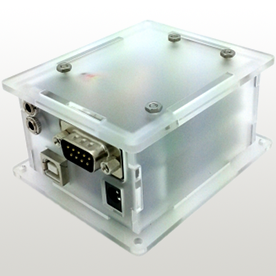
Tecla Shield UNO with iPhone 4S
The Tecla Shield by Komodo OpenLab is a wireless device that lets you control smartphones and tablets using external switches or the driving controls of your powered wheelchair.
I began using the Tecla Shield in January of 2013 after a long search for a device to operate
an iPhone with my limited dexterity. First off I was impressed with it's relatively low cost ($249 with a newer version being released in August 2013 for $349) compact size (fits in pocket on my ventilator) and ease of use.
Set Up
Set up was pretty simple, just power up, pair with the bluetooth, turn on voiceover and connect a adaptive switch. I found these inexpensive Ultra Light HD Switches for $26 a third of the cost of mini cup switches... I will say it did take some time to fine tune the scanning rate. (I would suggest turning down the volume while adjustmenting as having voiceover reading off options at a fast
pace is very annoying).
Mounting
Komodo offers a mount for the iphone at $99 however I opted for a Lifeproof bike mount and case for iPhone 4S, I got both on ebay for $70. Mounting was easy as the bike mount includes a few rubber spacers to fit small bars, pipes, etc. My mid line mounted joystick made for a perfect spot to attach the bike mount right beside the controller (1) while still being protected by the supporting bar (2).
 |
| (1) Top view |
 | |
| (2) Side view |
 |
| Full set up w/ switch |
Stay tuned i'll keep you updated...
Neil Mercer
Tuesday, September 3, 2013
Testing out assistive technology!
On Friday, August 10th, Equal Grounds hosted their second workshop this one focused on assistive technologies and had the opportunity to test out the EyePro, TrackerPro and EyeWriter. It was great to see many new faces interested in assistive tech, most notably having Eric Wan of Komodo Open Labs at the workshop.
Here are some of my thoughts of the devices we tested:
EyePro
http://www.words-plus.com/

Cons
TrackerPro
http://www.spectronicsinoz.com/product/tracker-pro

Cons
Comments: For those who have limited arm movement should definitely give this a try. It would take some time for your head and neck to get use to as it can tire you out.
Overall comments: Even though a button is needed, I felt that the TrackerPro was easier to control. And the price is better compared to the EyePro. Both devices are great for those that may have limited arm movement. I will continue testing out the TrackerPro for the next two weeks and will report back. There will be more workshops to come, keep following us if you are interested in assistive technologies and work opportunities.

Here are some of my thoughts of the devices we tested:
EyePro
http://www.words-plus.com/

Cons
- Too tiring on the eyes
- Price of $7,000
- High sensitivity but it just requires adjustments
- Not requiring the use of my arms
- EyePro software allows you click with your eyes
TrackerPro
http://www.spectronicsinoz.com/product/tracker-pro

Cons
- Tiring of the neck
- High sensitivity but it just requires adjustments
- Price of $1,200
- Requires additional button or software for clicking
- You don’t need to use the mouse
Comments: For those who have limited arm movement should definitely give this a try. It would take some time for your head and neck to get use to as it can tire you out.
Overall comments: Even though a button is needed, I felt that the TrackerPro was easier to control. And the price is better compared to the EyePro. Both devices are great for those that may have limited arm movement. I will continue testing out the TrackerPro for the next two weeks and will report back. There will be more workshops to come, keep following us if you are interested in assistive technologies and work opportunities.

Sunday, August 4, 2013
Equal Grounds Training Pilot
On Saturday July 6th 2013 I attended the Equal Grounds Training Pilot. To be honest, I wasn't sure what to expect from this workshop. However, I was pleasantly surprised by many of the discussions around access and employment barriers that many with unique abilities face in the workforce. I felt many of my longstanding criticisms about limited options through ODSP and tokenism were welcomed and considered in the idea that things need to change in a big way and that Equal Grounds might be the place to start!
The day also included a series of engaging social exercises conducted by Olena Cherkasova. One exercise required partners to resolve a conflict by only using your partner's name to communicate your argument. I found it showed how we use more than words to get ideas across. Overall, the experience really helped us open up as a group.

Finally we demo'ed a piece of technology called the Eye Writer that was developed to assist a graffiti artist with ALS draw by tracking eye movements and projecting designs on buildings. I was impressed with it's use of inexpensive cameras and open-source software making it accessible to all not like devices coming from "medical" developers costing hundreds of dollars.

I thoroughly enjoyed this pilot and the group of people who participated. I feel with all of the talents brought to the table Equal Grounds has the to potential to fill a much needed void and level the playing field. the next pilot takes place on August 10th & 11th. I highly recommend you check it out!
Wednesday, July 31, 2013
The Intentions of TechnologyEnables.Me

We will be testing out a variety of high and low technologies that enables people with different abilities in their professional and personal life.
If you have adaptive and accessible technologies you would like us to test out, please reach out to me @terrencewkho and www.terrenceho.com.
In the meantime you can check out my Torrance's blog SportsEnables.Me as he shares how his love for sports enables him and others.
Subscribe to:
Posts (Atom)